The expense I no longer have to log.
Apple Pay caught my tap payments. Revolut had clues about the rest. The hard part was teaching the two routes to agree on what counted as one purchase.
Keeping up was the hard part.
For years, I have used a spreadsheet based on the template shared by Mr RIP. It gives me the view I want: spending by category, multiple currencies converted to EUR, and net worth alongside income and expenses. The useful part is looking back at a month and understanding it. First, though, every transaction has to arrive there.
The older public version still shows the structural idea: asset and liability groups, a currency field, monthly columns, net worth and annual summaries. My version has changed over time, but it kept that useful separation between recording transactions and understanding the wider picture.
I had already made a decent start. An Apple Pay Shortcut could capture a payment and send its merchant, amount, currency and time to n8n. For payments covered by that automation, the row appeared without me typing it in.
Then I would book a flight or buy something online using my card details. That payment never passed through my Apple Pay shortcut. I was back to opening the sheet, entering the merchant, checking the currency and choosing two categories. A small task, repeated often enough to become a backlog.
I had automated part of the habit. The gaps were still mine to remember.
The missing input was already on my phone.
Revolut sends me a notification when a card payment happens. I could trigger a Shortcut from that notification, including for purchases that never went through Apple Pay.
The Shortcut looks for “Available credit” in the notification, then pulls the currency and amount from the “you spent” message. The regular expression below is fussy for a reason: the next steps expect the currency in group 1 and the number in group 2. If I change the pattern, those positions have to stay put.
from Revolut
(?i)\byou\s+spent\s+([€£$]|[A-Z]{3})\s*([0-9][0-9.,]*)in Body
in Matches
in Matches
Once the other fields are assembled, the Shortcut sends them to an n8n webhook. Both input routes use the same fields and identify their source. The payment becomes something the workflow can compare.
{
  "merchant": "Cloud Picker Coffee",
  "amount": "PLN18.50",
  "currency": "PLN",
  "source": "revolut_notification",
  "timestamp": "2026-09-19T10:30:00Z"
}transaction_data, encoded as a JSON string.The receiving code handles formats such as €40.00, PLN150.00 and 40.00€. It separates the number from the currency, normalises the merchant name and adds an internal transaction ID. Then it inserts the event into an n8n Data Table: the transaction inbox.
Then one payment became two events.
A tap with Apple Pay can also produce a Revolut notification. Both automations were doing their jobs, but together they could put the same purchase into my sheet twice. I needed a place to pause the payment before adding the row.
I made the “same payment” decision fairly narrow: the events must come from different sources, use the same currency, have almost exactly the same amount, and arrive within five minutes of each other. The merchant name gets a little leeway: Lidl can match Lidl Coolock.
Those timings do different jobs. Five minutes defines which events could describe the same payment. Thirty seconds gives the second source a chance to arrive. In this export, an event with no match takes the wait path regardless of which source sent it.
Apple Pay has higher priority. When it matches a lower-priority inbox event, the workflow confirms the winner and marks the other record as a duplicate. A lower-priority matching event stops. After the wait, the workflow reads the inbox again and repeats the decision before an unmatched event proceeds.
See the complete n8n workflow
This is the actual workflow screenshot from this project. Open it at full size to inspect the branches.
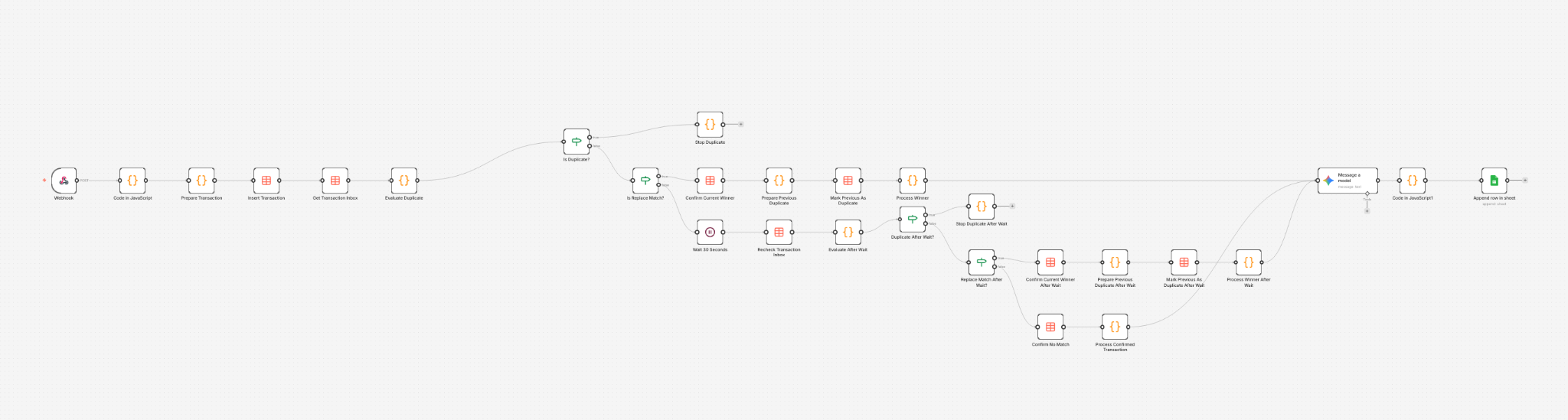 Open full-size workflow ↗︎
The wait helps with normal arrival order. It does not make late events or retries disappear; those are the cases I would tackle next.
A useful job for the model.
Once a payment has made it through that check, Gemini 2.5 Flash gets the merchant, amount and currency, plus the categories I actually use and a few merchant rules I have added. I ask it to return the expense fields and two categories as JSON.
That is where the model earns its place. A generic label can sound plausible and still be wrong for my sheet. I want a purchase to land where I would have put it myself.
Code does the parts I can state as rules: reading the payment, comparing possible duplicates and preparing a row for the sheet. The model handles the fuzzier question of what kind of purchase a merchant name represents.
For now, I tell the model to stick to my category list and honour the merchant rules. I have not yet added a final code check that rejects an invented category or reapplies an override. That is one of the reasons I still review the sheet.
Finally, the row appears.
The output looks like the sheet I already use. Merchant, original amount, currency, date and categories are appended to their existing columns. A formula provides the EUR view for foreign-currency expenses.
| M | D | Expense | Amount | Curr | EUR | Primary | Secondary | |
|---|---|---|---|---|---|---|---|---|
| 2 | 9 | 19 | Cloud Picker Coffee | 18.50 | PLN | ƒx | Leisure ⌄ | Coffee ⌄ |
It runs in n8n on an Oracle Cloud Always Free instance, inside Docker. That keeps the server footprint small, although model calls are a separate cost to watch.
The satisfying part is how ordinary the end result is. A purchase that used to become a task for later now has a route into the same record as a tap payment. I can spend my attention reviewing the month instead of reconstructing it.
The spreadsheet is still there. I still look at it. I still decide what the numbers mean.
I just spend less time getting the numbers into it.
A little further under the hood.
I like what this does for me now, but I do not want to pretend it catches every edge case. These are the parts I would revisit if I relied on it more heavily or shared it with someone else.
How I decide two events are one payment
I ignore events from the same source and anything already marked as a duplicate. The amounts have to differ by less than 0.005, the currencies must match, and the timestamps have to be within five minutes. I make merchant names easier to compare by lowercasing them, removing punctuation and tidying the spaces.
// Excerpt from the workflow's merchant comparison
if (a === b) return true;
const shorter = a.length <= b.length ? a : b;
const longer = a.length <= b.length ? b : a;
return longer.startsWith(shorter + ' ');
This is a narrow matching rule, not general fuzzy matching. If several candidates qualify, the closest timestamp wins; source priority breaks ties. Two genuinely separate purchases with the same amount and similar names can still be ambiguous.
Where duplicates can still slip through
The inbox remembers which payments are waiting, which one won, and which ones were marked as duplicates. In this version it does not automatically clear old records.
There is a trickier case, too: changing an inbox record does not remove a row that has already reached Google Sheets. If the higher-priority Apple Pay event arrives too late, I could still end up with two rows. Retries from the same source have their own gap because the generated IDs are not stable across attempts. I would fix that with a stable ID for each real payment, a write that can safely be repeated, and a plan for late or simultaneous events.
What I would fix before trusting every row
The model's answer has to be read as JSON. Right now, if that fails, the workflow can fall back to blank values and carry on. I would rather stop the write, keep the payment for review and fix it than quietly add a half-empty row.
I also want the last checks to happen in code: is the answer one of my real category pairs, did a merchant rule override the model's guess, and did the amount, currency and date come from the original payment rather than the model? At the moment, the date can fall back to the day the workflow ran. A late payment could then land on the wrong day. Those checks would make the sheet much easier to trust.
Why the EUR amount can change
The sheet uses GOOGLEFINANCE to show foreign-currency expenses in EUR. That uses a current exchange rate, not necessarily the rate Revolut or my bank used when the payment settled. It is useful for reviewing spending, but it is not an exact record of what left my account in EUR.